
In this Article:
Try Kanbanchi now
Start your free trial


Fancy a quick history lesson? (don’t worry, it’s really nerdy!) So, did you know that Kanban wasn’t the brainchild of some super-organised Marie Kondo-esque software dev who wanted to make our working days flow smoother….?
In fact, we have to go back to the early 1600s in Japan to find its earliest beginnings. The country was recovering from a time of immense social and economic upheaval.
Around this time, the streets of Japanese towns became more densely populated with shops and local businesses. These places were competing for attention (and custom), and this is where the term Kanban first appeared historically.
It’s basically a melding of two Japanese words, ‘Kan’ meaning sign, and ‘Ban’ meaning a board. To overcome the challenge of competing for trade and customers, shop owners began making their own signs, called ‘Kanbans’, to draw people into their premises and show them what they could buy…
This idea built and built over the centuries, but it wasn’t until the 1940s that the notion of Kanban as we recognise it today came into being.
For that, we have to thank the CEO of Toyota Motors, Kiichiro Toyoda. During this decade, the company was experiencing a slump, and its fortunes needed revival; he gave himself three years to turn it around.
He employed Taiichi Ōno, a young industrial engineer who speedily rose through the ranks there. By 1949, he was the machine shop manager and could begin experimenting with new tools and principles of work organization, eventually he was promoted to a director position.
What he did there was categorize seven types of waste that reduce system input and performance.
Overproduction was a waste, as customer demand can change over time, and so was maintaining a large inventory of raw materials.
The only solution? Produce what is needed and only when it’s needed.
It required keeping inventory to a minimum while ensuring a smooth, high-flow process throughout.
But this approach had its problems:
During a visit to the US, Ono observed that supermarkets kept shelves stocked with just the right amount of each product.
When he returned to Japan, he began using paper cards to signal and track demand in his factory and named the new system ‘Kanban’. It worked like this:
This system:
And it was eventually adopted in nearly all processes at the Toyota company. The power of this system enabled them to move from operating at a loss to the global competitor they are today.
Taiichi Ōno’s work gave rise not only to the new meaning of Kanban as we now know it but also laid the foundation for modern management techniques.
So, step back now and think about your own team and place of work…
Ever walked past a team’s desk and seen a wall covered in colorful sticky notes?
Or perhaps you’ve opened a digital tool and felt an instant sense of relief seeing tasks neatly organized into columns?
That’s the magic of the Kanban system as we know it today.
What started as a revolutionary system on Toyota’s manufacturing floors in the 1940s has evolved into the backbone of modern digital productivity.
But here’s the problem: most teams know they need a visual workflow, but they aren’t sure how to structure it beyond a basic To Do, Doing, Done.
If you’re looking for a way to stop the ‘Where are we with this?’ Slack messages and start actually finishing work, you’re in the right place.
In this guide, Kanbanchi is going to look at real-world Kanban examples that you can steal, adapt, and implement today, especially if your team lives and breathes in Google Workspace.
So, let’s get into first gear and drive off…
Find more articles on Kanban systems here
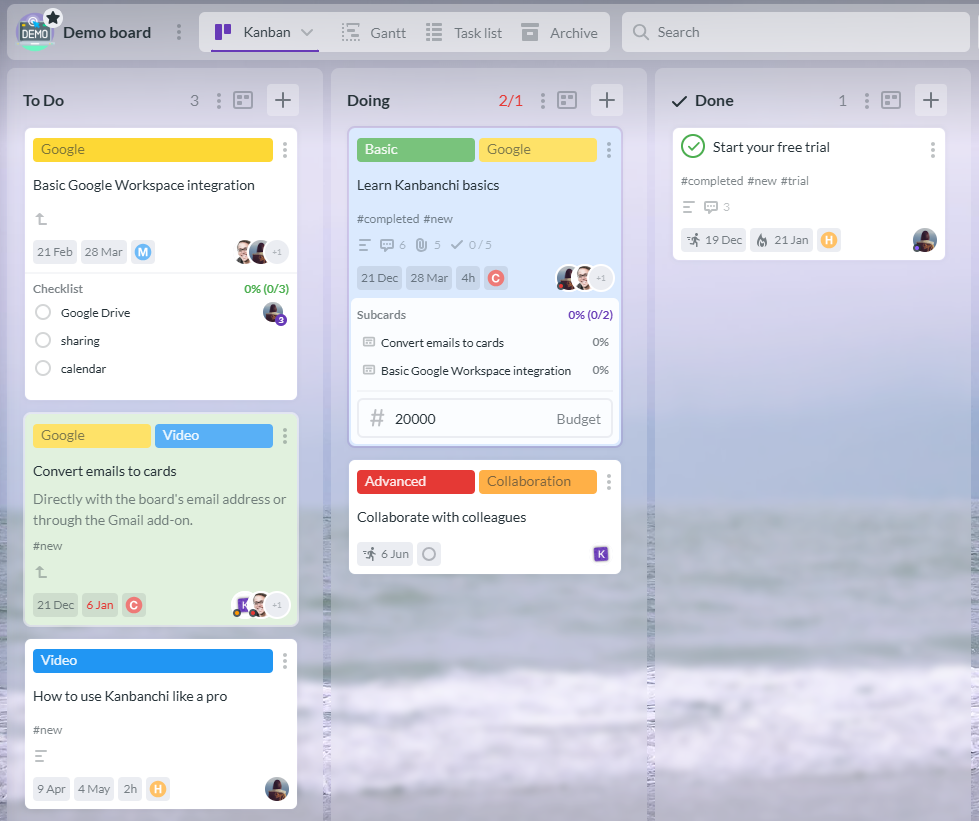
A simple yet effective Kanban setup with To Do, Doing, and Done columns. WIP limits help teams focus on finishing tasks before starting new ones.
Before we dive into the industry-specific galleries, let’s strip Kanban back to its bones. What makes a Kanban system example actually work? It’s not just about the columns; it’s about the flow.At its core, every effective Kanban board consists of four vital elements:
These are the cards. Every card represents a single work item: a blog post, a bug fix, or a sales lead.
These represent the stages of your workflow. No work item should ever leapfrog a column; it must flow through the process.
This is the secret sauce. By limiting how many cards can be in the In Progress column at once, you force the team to focus on finishing rather than starting.
This defines where the work starts (the backlog) and exactly when it is considered Done.
A simple board is great for personal errands. For professional project management, a simple board can actually hide bottlenecks. If your Doing column is 20 cards deep, is the work actually moving?
Probably not.
By adding Review or Testing stages, you gain visibility. You see exactly where the traffic jam is happening. This transition from a basic list to a professional Kanban example is where Kanbanchi shines, providing the structure that a standard spreadsheet can’t.
Let’s now take some time to look at more specific examples of Kanban project marketing ideas for teams.
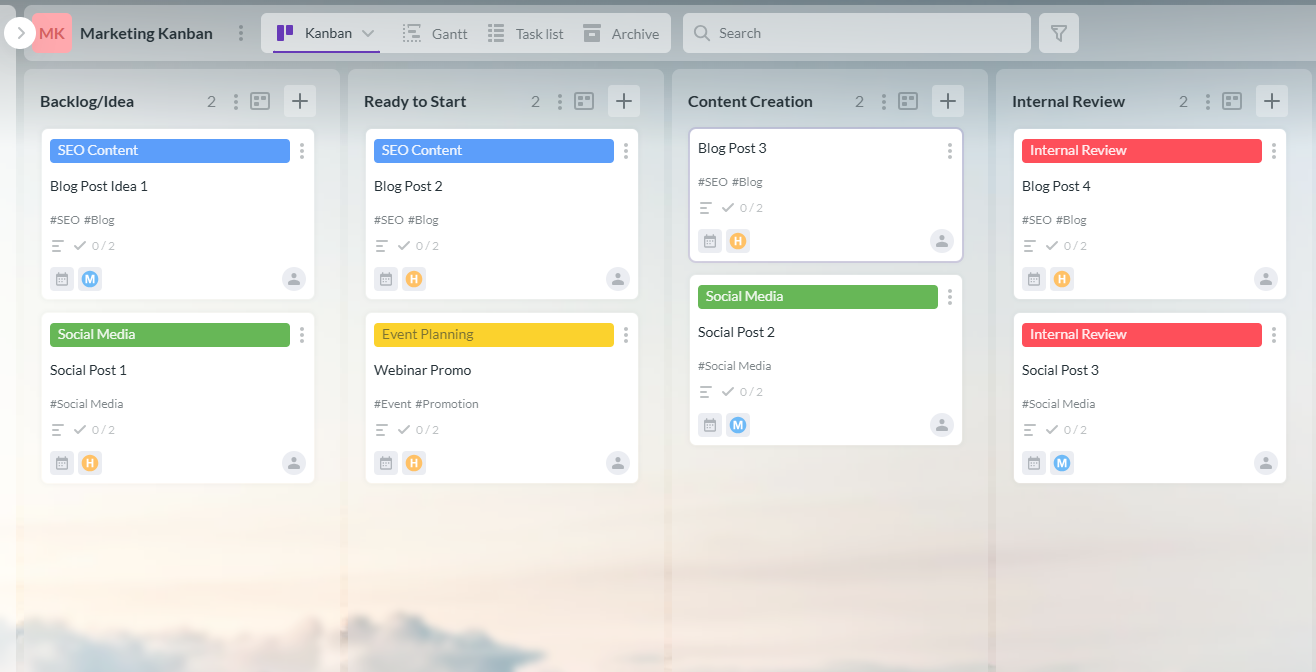
Organize marketing tasks with this Kanban board template using columns, swimlanes, and WIP limits for smooth workflow.
If we’re honest, marketing is often a whirlwind of:
Without a clear example of Kanban, your creative team can quickly drown in a sea of email threads and disconnected Google Docs.
A high-performing marketing Kanban board doesn’t just track tasks; it manages the entire creative lifecycle. You need a way to figure it all out without losing time (or hair).
Here is how you should structure it to maintain sanity. Ideally, we think there should be 6 columns, but it’ll vary by project and by what your team needs to consider.
This is your someday pile. Every wild idea for a social post or webinar goes here to be viewed or actioned at some point now or in the future. Think of it as your original post it note!
These are prioritized tasks. If a card is here, the brief is finished, and it’s ready for a creator.
This is where the magic happens: writing, designing, or filming.
Before the client or manager sees it, the team checks for quality.
A dedicated lane for waiting on stakeholders.
The finish line. You’ve made it! Well done, now time for that drink at the pub…
One of the most powerful features in a Kanban project management example is the use of swimlanes.
Instead of a single board, swimlanes let you break your workflow into horizontal lanes. You might have one swimlane for SEO Content, another for Social Media, and a third for Event Planning.
This prevents your daily social posts from being buried under a massive 3000 word whitepaper.
In Kanbanchi, marketing teams gain a massive advantage.
Key Task: Set WIP limits on your Internal Review column. If too many items get stuck there, it’s a sign that your managers are a bottleneck. Fix the flow, and you fix the output.
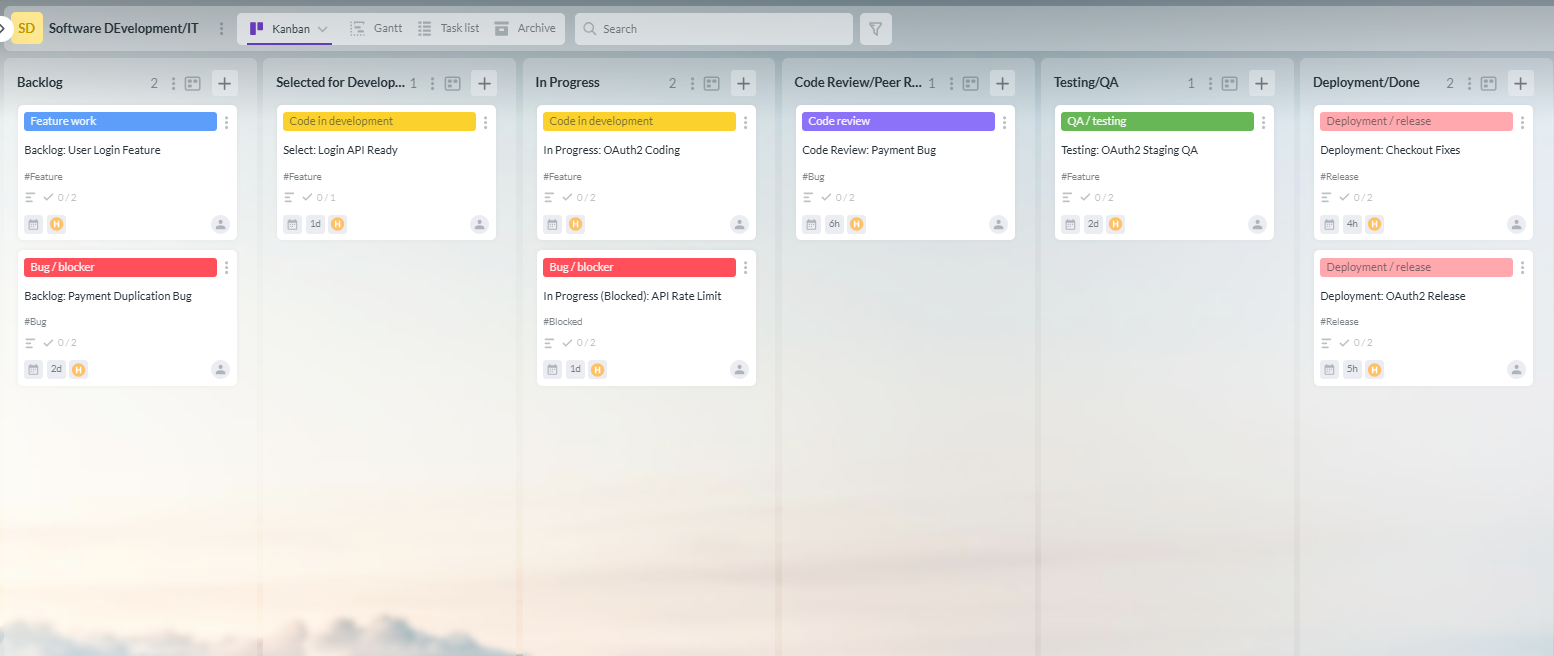
IT Kanban board with workflow stages, blocked tasks, and WIP limits for smooth delivery
In the world of software development, speed is nothing without stability. If you’ve ever worked in a sprint that felt more like a marathon, you know the pain of developer burnout and overwhelm…
This is where a professional Kanban system example transforms from a simple task board into a high-velocity engine for continuous delivery.
Unlike traditional project management, an IT Kanban board focuses on reducing lead time, (the time it takes for a feature request to go from an idea to a live piece of code).
To handle the complexity of coding, your columns need to be more granular than a standard business board:
One of the most important elements in this Kanban project management example is the Blocked status.
In Kanbanchi, you can visually flag a card as blocked. Whether it’s waiting on an API key or a client clarification, a blocked card should be a red alert for the team.
For IT teams using Google Workspace, Kanbanchi’s ability to sync with Google Calendar is a game-changer.
You can map deployment dates directly to the team calendar, ensuring that everyone from marketing to support knows exactly when a new feature is going live.
This visual transparency eliminates the black hole effect often found in complex dev cycles.
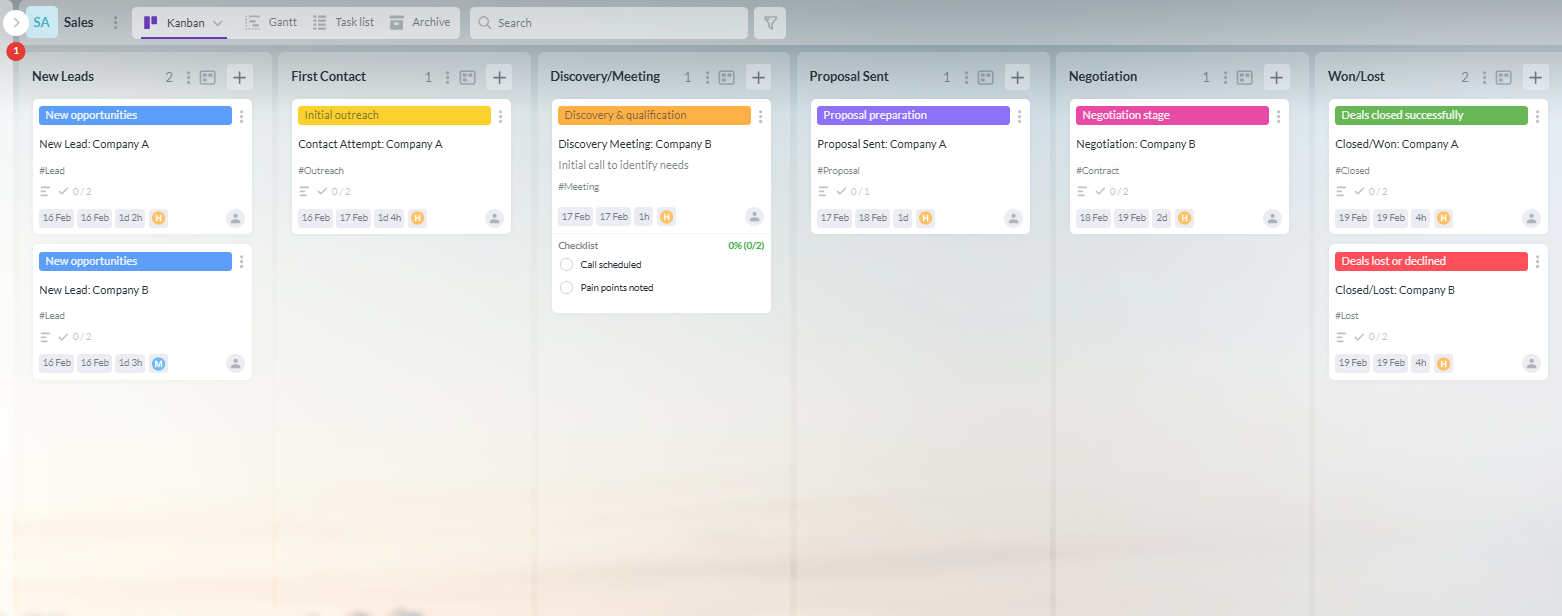
Visualize your sales pipeline with this Kanban board, featuring color-coded cards for leads, proposals, negotiations, and closed deals to improve follow-ups and revenue tracking.
Sales is a numbers game, but it’s also a game of timing.
If you’ve ever forgotten to follow up with a warm lead or lost track of which stage a deal was in, you know that a messy inbox is where sales go to die. Using a Kanban example for your sales CRM provides a visual pulse of your revenue.
In a Kanban-style CRM, each card is a deal, and each column is a step closer to Closed and Won.
It’s the ultimate antidote to the “I think we’re doing OK” mindset.
When your pipeline is visual, you can spot dry spells before they happen.
If your Proposal Sent column is empty, you know your income will dip next month.
This Kanban system example forces you to balance your time between hunting for new leads and closing existing ones.
Most CRMs are overly complex and expensive.
If your team already uses Google Workspace, Kanbanchi serves as a Lite CRM that lives right where you work.
By seeing your entire pipeline at a glance, you spend less time digging through emails and more time closing deals.
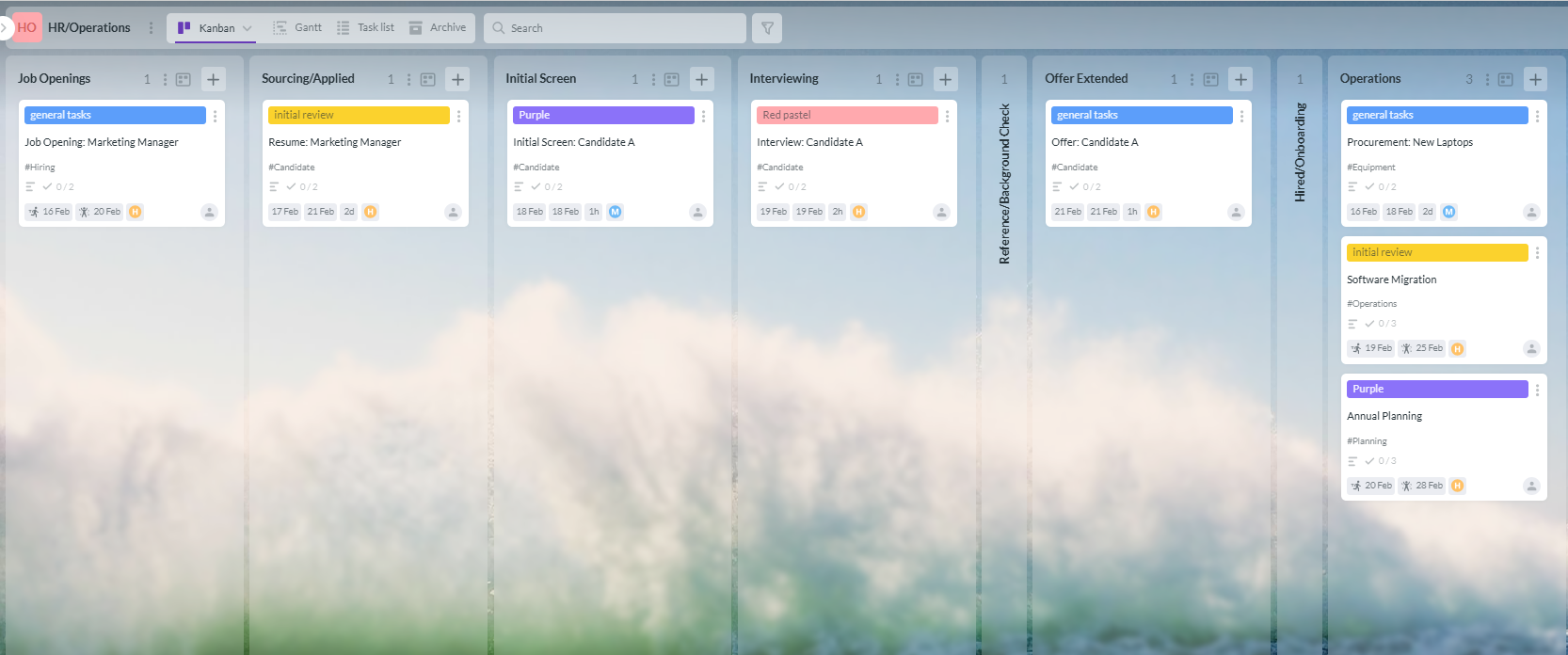
HR and operations workflows with this Kanban board
If you’ve ever felt that HR is just a mountain of paperwork and check-ins, you haven’t seen an example of Kanban applied to People Operations.
From the moment a job opening is posted to the day a new hire completes their first month, Kanban provides a transparent roadmap that keeps the human element from getting lost in the shuffle.
In HR, the product is the candidate experience. A bottleneck here not only delays a project; it also costs you top talent.
A standard recruitment board allows the entire hiring team, from the HR manager to the department head, to see exactly where a candidate stands.
Beyond hiring, Kanban is a lifesaver for general operations. Think about an office move, a company-wide software migration, or even the annual planning cycle. These are complex Kanban system examples with numerous moving parts.
HR and Ops teams are the heaviest users of Google Forms and Sheets. With Kanbanchi, you can attach an applicant’s resume (stored in Google Drive) directly to their card.
When it’s time for the interview, the hiring manager doesn’t need to hunt for the file; it’s right there on the board. This seamless flow turns a chaotic hiring season into a structured, professional process.
START A FREE TRIAL WITH KANBANCHI
You’ve seen the Kanban examples. You’ve visualized the columns, the cards, and the flow. But now comes the how.
If your team is already living in the Google ecosystem using Drive for docs, Sheets for data, and Gmail for communication, you don’t need another isolated software island. You need a bridge.
Kanbanchi isn’t just another project management tool; it’s the only professional Kanban system example built specifically to feel like a native part of Google Workspace.
Most tools claim to integrate with Google, but that usually just means you can add a link. Kanbanchi goes deeper:
While many tools offer a basic board, Kanbanchi provides a Kanban project management example that scales with your complexity.
If you can use a Google Doc, you can use Kanbanchi. There is no steep learning curve or weeks of onboarding.
It’s designed for the modern professional who needs to get work done now, not spend hours configuring a complex database.
By choosing a tool that mirrors the interface you already use every day, you ensure high team adoption. After all, the best Kanban board in the world is the one your team actually uses.
If you’ve been considering making the switch from a bunch of disconnected tools that lead to confusion, delays, and missed deadlines, there’s never been a better time to talk to us about investing in Kanbanchi to turn every project into a complete success.
Our deep dive into Kanban examples is really comprehensive, but if you’ve still got one or two unanswered questions, this FAQ section will answer them. Feel free to contact us directly if you’d like a more in-depth discussion about this topic.
Absolutely. Personal Kanban is a popular approach for managing everything from home renovations to daily errands.
Use a simple To-Do, Doing, and Done structure to avoid starting five things and finishing none.
The best tool depends on your ecosystem. For teams already using Google Workspace, Kanbanchi remains the premier choice due to its native integration with Drive and Gmail.
If you need a professional Kanban project management example that feels like a natural extension of your existing tools, that’s where you’ll find the most value.
There is no magic number, but most successful professional boards have between 5 and 7 columns.
If you have fewer than 3, you aren’t seeing enough detail; if you have more than 10, your process might be over-engineered.
The four pillars are:
How to Build an Effective Kanban System in Your Business in 10 Steps



In this Article:
Start using Kanbanchi now
Start your free trial